
The Salesforce Sprint ’26 Release Notes for Marketing Cloud Engagement (SFMC MCE) introduces various features to enhance your marketing efforts and data management. I am explaining the features I have liked most and have started using the following technical features.
Quickly create Marketing Cloud Next users
This feature helps us to duplicate existing users from Marketing Cloud Engagement. When you create users this way, those users are automatically assigned the necessary permissions to start using Marketing Cloud Next right away. Any admin with the Marketing Cloud Administrator role in Marketing Cloud Engagement can use this feature.
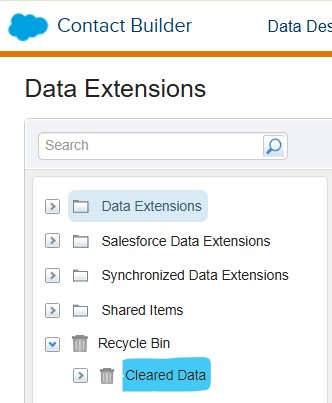
Introduction of Cleared Data folder
This is a cool feature that I like most. Sometimes users may delete the data unintentionally. This is a cool feature that I like most. Sometimes users may delete the data unintentionally. If they do it unintentionally clear the data from a data extension, admin can restore it into a new data extension. When you use the Clear Records button to remove all records in a data extension, that data moves to the Cleared Data folder and remains there for 30 days. The Recycle Bin in Contact Builder now includes a Cleared Data folder.
Client secrets for API integrations
You would have got some mails from the Salesforce to improve the security for Client secrets. All client secrets for API integrations have a 180-day expiration period. Client secrets generated before this date expire on September 30, 2026. You can see the summary table on the Installed Packages page in Setup to view expiration dates for your client secrets.
Package Manager -Original External Key Values
When you deploy entities with Package Manager, the original external key value that’s specified in the originating account is retained. Journey Builder entry sources keep the event definition key value specified in the originating account. This feature makes it easier to deploy objects called by external APIs by removing the need for manual intervention.
These following entities are supported.
- Journey Builder Entry Source Event Definition Key
- Data Extension External Key
- Shared Data Extension External Key
- Email Triggered Send External Key
- Email User-Initiated Send External Key